loading...

Chistasoft company

بازدید : 31
دوشنبه 3 ارديبهشت 1403 زمان : 16:54

What is Google Review?

In general, Google reviews are actually online comments that your customers record about their experiences with your business, services, or products. These comments are accessible through your business profile in Google Business.

When the name of your company or brand is typed in the Google search engine, Google can display your ranking based on these comments. Also, the comments of your previous users and customers are displayed in the search results. Google is the largest search engine on the Internet. Therefore, the search results on this platform will have a significant impact on your online reputation and more sales in the future.

How do Google reviews work?

Google reviews actually make it easy to identify your business and validate it for new potential customers. Customers can review these reviews and check whether your business is the right choice for their needs and expectations. These comments also create an ideal opportunity for businesses to be aware of the unbiased and fair opinions of their customers regarding their products and services.

This helps to improve the service and get to know the customers better. Writing and reviewing Google reviews is a very simple process. You can ask your customers to write a review for your business on Google Review. Google receives customer feedback by providing a very simple form. As soon as it is submitted, the customer's comment will be visible in your Google Business profile.

Where to read Google reviews?

You have three different ways to check the opinions of your customers in Google Reviews or Google Maps:

Google Knowledge panel:

When someone searches for your brand or company name on Google, Google presents them with a page like a digital business card. In this digital business card, all information about your business (including address and contact number) is provided. This panel is known as Google Knowledge panel. Google uses your Google Business profile and the information contained in it to display this information.

If your business has different branches, Google assigns a local Knowledge panel to each of the branches. This profile provides local search results for the branch in question. Also, some comments of your previous customers are also displayed in this panel.

Google 3-pack results for local searches:

The following page is an example of Google results for users who searched for the phrase "nearest plumber to me". This result is called Google 3-Pack or Local Map Pack. This map actually contains three local businesses related to the search term.

Google shows the best results based on relevance, skill and proximity of businesses to the searcher. Google reviews along with business contact information are also provided in this profile. Thus, users can make an informed decision.

Search on Google Map:

Most of us use the Google Map service to find a store or shop. Google Map displays store information along with ratings and some comments from previous customers. When your customers leave a review for your business on Google, they are also visible in Google Maps search results.

So when someone searches for your business on Google Maps, they can see the rating as well as positive and negative comments about your business.

بازدید : 58
سه شنبه 28 فروردين 1403 زمان : 15:18

What is technical SEO?

We talk about technical SEO when we act on very specific elements, linked to the technique of a website, with the aim of improving its SEO. Technical SEO encompasses several topics such as loading time or security.

Certain technical elements directly affect the ability of search engines to crawl and interpret a website. Working on this facet of SEO is therefore an important building block of the positioning process. It is also not uncommon for errors made linked to technical elements to seriously penalize SEO.

Conversely, a website whose technique has been worked on will more easily benefit from good visibility. This is all the more valid for websites which operate in particularly competitive themes, and which face other very well optimized competing sites. In this scenario, technical SEO clearly cannot be neglected. Carrying out a technical SEO audit makes it possible to identify problems or optimization deficits on a site, then to establish an appropriate action plan. This is a key step within any SEO approach.

What are the main technical SEO criteria?

Crawlability

Before offering some of their pages in their results, search engines crawl websites through their internal links. But they benefit from limited resources for this. One of the main challenges of technical SEO therefore consists of ensuring that the pages explored are those which are interesting for SEO. This involves organizing internal links and developing a tree structure that encourages the exploration of the pages to be positioned.

It is also important to ensure that the indexing robots do not encounter any problems during their passage (404 responses, pages that cannot be indexed by mistake, etc.).

Other levers allow you to act on the exploration of engines: the robots.txt file will allow them to prohibit access to certain directories or types of pages. This is with the aim of limiting the exploration of content which is of no interest for SEO, or which poses a problem, and to favor the exploration of those which must position themselves.

Duplicate content icon

The presence of duplicate content within a site is a bad point for SEO. When faced with identical content, search engines must identify for themselves which version should be taken into account for SEO. In the end, it is possible that none of the versions are actually positioned.

However, it is possible to guide search engines by indicating on duplicate pages, via the addition of specific HTML tags, the reference version (called “canonical”) to be positioned. These tags take the following form:

Note that a page can indicate its own URL in a canonical tag.

Managing duplicate content by adding canonical tags is an important point in technical SEO.

web performance illustration

Web performance (loading time and process) has been a positioning criterion for search engines, particularly Google, for many years. The latter has also recently evolved its algorithm to better evaluate the loading process of the analyzed pages.

The expectations of engines (and before them, users) on this subject are increasingly high. Today, a page that is very slow to load, and not very stable for the user, has less chance of being well positioned than an equivalent competing page, which offers an optimized experience.

Auditing your web performance and implementing optimization actions when necessary is therefore part of the technical SEO optimization process.

HTTPS secure site icon

Website security is also important in SEO. Today, and for several years now, the implementation of HTTPS is part of the standards. Obtaining an SSL certificate, among other things, gives users confidence that their data is secure. It is precisely for this reason that search engines have made it a ranking criterion.

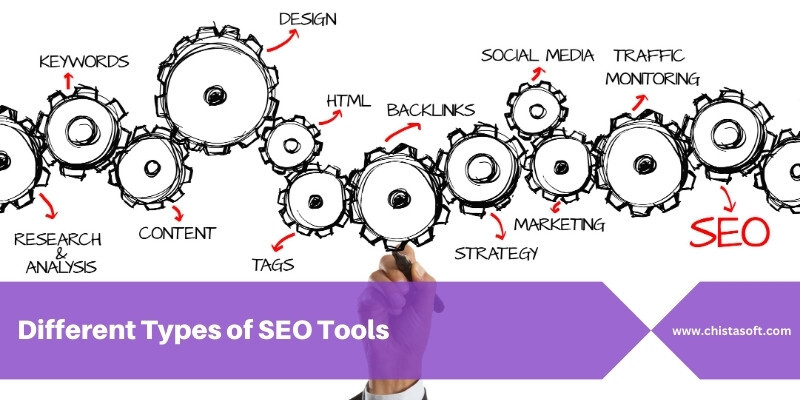
Different Types of SEO Tools

What Is Website Health?

Technical SEO Checklist

بازدید : 36
شنبه 18 فروردين 1403 زمان : 15:24

Scheduling tools for social media

A social media scheduling tool allows you to create content in advance and determine when it will be published on the networks.

Most platforms natively integrate options for this purpose, but they are rather basic. With third-party tools, you will have more flexibility and functionality. Additionally, you can schedule content for multiple social media accounts from a single dashboard.

By freeing up time for content creation, these tools actually offer benefits that go far beyond the practical side of programming.

Scheduling tools for social media offer a workflow that drives collaboration. It is in fact easier to work together on content prepared in advance than on publications pulled out of the hat at the last moment. This is a particularly important asset within large teams or organizations in regulated sectors.

This built-in collaboration process also allows content to pass through a predefined series of approvals. With certain tools, it becomes possible to ensure that everyone can contribute to content, but that only experienced members of the team can approve their publication.

Benefits of Scheduling Tools for Social Media

Create social media content in advance and develop a consistent posting schedule for multiple accounts.

Automatically publish content at predefined times.

Manage your cross-platform campaigns from a common interface.

Create and publish content in batches to focus your efforts and avoid constant interruptions.

Collaborate effectively with different teams.

Create an approval workflow to review all social media content before publishing.

Pause posts on all platforms in one click in the event of a major event or crisis.

Digital marketing and Its impact on businesses


Different Types of Logos + Samples


9 Common Site Errors + How To Fix Website Errors

بازدید : 43
شنبه 11 فروردين 1403 زمان : 15:00

Technical SEO Checklist

Technical SEO is paramount for several reasons, each contributing to the overall success and visibility of a website:

• Crawlability and Indexation: Search engines use bots to crawl websites and index their content. If a website is not properly optimized technically, these bots may encounter obstacles, leading to incomplete indexing or even excluding important pages. Technical SEO ensures that bots can efficiently crawl and index all relevant pages, maximizing the chances of being included in search engine results.

• Website Speed and Performance: Page speed is crucial to user experience and search engine rankings. Technical SEO involves optimizing elements like images, code, and server response times to improve loading speeds. Faster-loading websites provide a better user experience and receive preferential treatment in search engine algorithms.

• Security and Trust: Technical SEO includes implementing security measures such as SSL/HTTPS encryption. Secure websites instill trust in users and search engines alike, leading to better rankings and higher user engagement. Additionally, secure websites are less vulnerable to cyber threats, safeguarding sensitive user data.

Free Keyword Gap Analysis Tool

How to promote your business?

Who Is A SEO Consultant?

بازدید : 26
يکشنبه 27 اسفند 1402 زمان : 15:12

What Is a Seo Target Audience


Firstly, you need to know what a target audience is.

“Your target audience are individuals you intend to attract to your website.”

In terms of SEO that means your target audience are current or potential customers who are using search engines to find businesses like yours.

These are the people you want to visit the site. The exact person who has a problem that your product can solve. The more engagement you have with this audience the more benefits down the line in terms of brand affinity and lifetime value.

How To Define Your Target Audience Seo


To define your target audience and direct them to your website, you will need to know who specifically is searching for your product or service and the types of searches they are using.
This might sound like basic keyword research for SEO, but understanding your target audience goes beyond that.
As we get to know the audience better, this will inform your entire SEO strategy from the way that you structure landing pages, to the way that content is presented on the site.
The strongest SEO strategies are the ones that are rooted in understanding the target audience, so they can use them to guide every action they take as SEO is about marketing to people, not search engines.


The Difference Between A Target Audience & A Buyer Persona


It’s easy to confuse your target audience with buyer personas. They may have some crossover and can certainly be used to inform each other, but there is a distinct difference that we need to understand.


Target Audience


Your target audience is a top-level identification of a group of people who may be interested in your goods or services. They are classified as your ideal or purchasing audience.

To paint a good picture of your target audience, here are the most common variables to consider:

Gender
Age
Social class
Highest level of education
Location
Purchasing power
Consumption habits
For example, let’s say you have a Scottish menswear fashion brand that sells clothing, shoes and accessories for outdoor sports.

Remember to be as specific as possible when defining your target audience.
You may be thinking – why not try targeting everyone in the market?

The simple answer is that this approach won’t work.
You cannot appeal to everyone. The website and messaging should be narrow and targeted. This means that it has a better chance at differentiating with the competition and being more relevant and visible in the SERPs.

Types of Graphic Design

SEO Consultant: What Does A SEO Consultant Do?

best seo blog : how to optimize your blog for search engines

بازدید : 16
چهارشنبه 11 بهمن 1402 زمان : 15:38

What are SEO Tools?


SEO is the shorter version of Search Engine Optimization, which is used to improve rankings on the search engine’s search results page. SEO tools help you actively compete with other websites by providing you with the data and support you need to successfully implement a well-thought-out and targeted SEO strategy.

SEO tools come in many forms. These tools include analytics, links, keyword research, mobile, on-page, local SEO and research, rank checking, website speed, and even WordPress SEO.


Types of SEO Tools


Google Analytics
Google Analytics is one of the best and most recommended SEO tools because it provides detailed information about your website and data, unlike any other tool. Google is the most popular and famous search engine. You can set up and manage Google Analytics for your website using rankingCoach.

Google Search Console
Previously known as Webmaster Tools, Google Search Console is used for SEO as the main focus of this tool has to do with search and optimization of your content. Google Search Console provides valuable, actionable data as it does in Google Analytics, but it does so in a simpler way, and the access is also easier.

Moreover, it also aids in learning about the wrong backlinks that carry great importance when it comes to off-page SEO and helps deal with any issue of manual penalty that the website might have to go through.

rankingCoach
The complete digital marketing solution for small and medium businesses. The app offers keyword tracking as well as SEO site audit tools and step-by-step video instructions for improving On-page and Off-page SEO.

Final Word
While these tools can help you get started on SEO, you need to understand that some of these are very useful and powerful. The SEO tools mentioned above are the best ones that have helped numerous websites improve their rankings in regards to their content.

Site design based on WordPress


Creating a Website with PHP

بازدید : 22
سه شنبه 3 بهمن 1402 زمان : 15:04


Tips and Best Practices for Improving Your SEO and Getting to the first page of Google


If you’re trying to boost your website’s visibility, there are four key areas you should focus on: on-page experience, technical SEO, user experience and content, and local SEO optimization.

Optimizing Your On-Page Experience
To optimize your website for search engines, you must enhance your on-page experience. Start by creating unique and compelling page titles that accurately reflect the content and differentiate your site from competitors. Well-crafted meta descriptions, as recommended by Google, can further improve your SEO and entice users to click through to your website.

Ensure that your chosen keywords and phrases are strategically incorporated within your webpage content—however, don’t go overboard. Use keywords naturally and avoid keyword stuffing, which can harm your website’s ranking. When creating webpage content, optimize your header tags (H1, H2, etc.) to provide clear structure and hierarchy to your content—this is incredibly important when Google is trying to categorize what your website is all about. In the same vein, structure your URLs in a readable format that includes relevant keywords.

Finally, incorporating internal and external links within your content is a crucial aspect of optimizing your on-page experience. Internal links help users navigate your website easily and provide search engines with additional context about your content. External links to reputable sources can enhance the credibility and authority of your website.

Improving Technical SEO
Technical SEO can go a long way in improving your website’s user experience and SEO. Start by optimizing your website’s speed and performance since faster-loading websites tend to rank higher in search results. Implementing techniques such as image compression, browser caching, and minification of CSS and JavaScript files can significantly enhance your website’s loading times.

It’s also critical that you create and submit an XML sitemap to search engines—this sitemap acts as a roadmap, helping the search engines crawl and index your website more efficiently. At the end of the day, it ensures that all your website’s pages are discovered and considered for ranking.

With mobile devices increasing and dominating internet usage, ensuring mobile-friendliness and responsive design is essential. Google considers mobile-friendliness as a ranking factor, and a mobile-friendly website provides a seamless user experience for your users across various devices.

To effectively monitor your website’s performance, traffic, and conversions, implement tracking tools like Google Analytics. These tools provide valuable insight into user behavior, allowing you to analyze and adjust your SEO strategy accordingly.

User Experience, Content, and Design
When it comes to optimizing your website, user experience (UX), high-quality content, and intuitive design are key factors that search engines consider. A well-designed and user-friendly navigation helps visitors, and search engines quickly find the information they need. Aim for clear and intuitive calls-to-action that guide users towards the desired actions, such as making a purchase or submitting a contact form.

Producing high-quality, valuable, and unique content is essential for both user engagement and search engine optimization. Incorporate your chosen keywords naturally within your content, including headings and subheadings. Add relevant images and videos to enhance the visual appeal of your pages, ensuring proper optimization of these multimedia elements for faster loading times. Proper formatting, including bullet points and subheadings, improves readability and user experience.

Leveraging social media platforms to promote your content and engage with your audience can also boost your website’s visibility. Encouraging customer reviews and actively managing your online reputation helps establish trust and credibility among potential customers.


Local SEO Optimization
Location-focused SEO is vital for any business looking to target local customers.business listing management

Optimize your Google Business listing by providing accurate and up-to-date information about your business. Consistency is key regarding your critical business data like your name, address, and phone number—ensure it’s accurate and the same across all online platforms. Services like Business Listing Management can help ensure your essential listing information stays up-to-date across nearly 200 websites, search engines, mobile apps, voice assistants, GPS systems, and social networks.

Targeting local keywords and creating location-specific content helps increase your visibility within your target geographic area. By aligning your SEO efforts with local intent, you can attract highly relevant traffic and improve your chances of turning leads into customers.

How to grow Instagram followers organically

WordPress Website Development Company

بازدید : 49
شنبه 30 دی 1402 زمان : 15:43

What is Graphic Design?

Graphic design is the process of creating visual content that helps to communicate messages with an audience. The art of visual communication is essential, especially for brands looking to connect with their target audience, and graphic design is the perfect solution.

Brands take advantage of graphic design in their logos, marketing materials, ads, website graphics, and even internal documents and email communications.

To further understand how graphic design works, you need to understand the different elements that make up a design. These graphic design elements include:

Color

Typography

Line

Shape

Size

Space

Texture

Hierarchy

There are also a number of principles that graphic designers need to follow in order for their designs to be effective and grab attention. You may have heard these called Gestalt design principles.

Some of these principles include:

Simplicity

Proximity

Continuity

Symmetry

Putting together all of the different elements and principles can turn a design into a professional-looking graphic.

While graphic designers by trade have often been trained on these principles, having a basic understanding can help anyone with little to no design skills create an eye-catching visual design.

Why is Graphic Design Important?

Graphic design is important for a lot of reasons. First, it’s the basis of every logo design you’ve ever seen. Second, think about all of the social media content and advertisements you see every day. Yep, all graphic design.

In addition, graphic design is a part of book cover design, magazine page layouts, product design, apparel design and more.

Here are a few statistics that help further our point of just how essential the graphic arts are.

A Brief History of Graphic Design (Infographic)

Graphic design isn’t just a new age thing. In fact, graphic design has been around for thousands of years — of course, it’s looked pretty different throughout the years.

We’ve put together an infographic detailing the history of graphic design, and how it’s turned into what we know today.

What Does A SEO Consultant Do?

best seo blog

Targeted Seo

بازدید : 18
دوشنبه 4 دی 1402 زمان : 13:50

11Modern Website Design Elements

Unique Typography

Most companies have a particular font or typography that they use to help their customers immediately identify them versus their competitors. In recent years, designers have access to a larger selection of fonts making it easier for businesses to more accurately express their brands through typography

Why is unique typography useful in modern web design?

Typography is a singular design element that gives a uniform look across each page on a website. For instance, The New Yorker website leads visitors from one section to another based on the typography and font sizes.

When creating your company's brand, your choice in typography can indicate subtle hints about what you represent. Is your business fun or serious? Functional or informational? Regardless of what font you choose, be sure your designer considers its applicability across browsers and computers. Choosing a font that is not supported by common browsers and computers could mean that your website will display awkwardly on different devices.

Engaging & Responsive Hero Images

You don't have to go far beyond the popular publishing website Medium to see an example of a great hero image.

Images like this one do away with the concept of above and below the fold, instead offering a singular point of view. By focusing on just the image with text rather than a CTA or social buttons, Medium creates a strong visual experience that encourages you to scroll down to read more.

Hero images are also often placed in the background with text and other content overlaid on top. Regardless of the approach you utilize, large images can help visually tell your story without having to rely on just text.

Why is it useful?

Hero images set the tone for your website without the need for text or video — the right image can instantly give visitors a sense of what your brand is about, what you do, or what makes you unique. As a result, it’s a good idea to both brainstorm hero image ideas and get feedback from multiple sources to see which image offers the biggest impact.

Background Videos

Videos that automatically play in the background can add a lot of intrigue to a page. They can be used to tell a story and significantly reduce the amount of other content that is needed to explain your business.

Take Wistia's website, for example. When you land on their homepage a large video automatically starts playing in the background, and by clicking on the play button, you get a deeper look at the company:

Why is it useful?

Background videos focus on enticing the visitor from the moment they land on your page. The video allows your visitor to understand the key points about your company without ever having to read a single line of text.

In addition, video is processed 60,000 times faster by our brains compared to text. While people are often hesitant to read heavy blocks of text, videos appear effortless and can be consumed very quickly. It also helps that connection speeds are increasing and mobile device sizes are growing, making for better video experiences.

Semi-Flat Design

Simply put, flat design is any element that does not include or give the perception of three dimensions, such as shadows. Not only is flat design easier for users to understand, but it can also load more quickly on websites without complicated or overly technical elements.

Many organizations — both large and small — have shifted from realistic skeuomorphism to flat design. However, companies like Uber have put their own spin on the style by adding subtle shadows and dimensions.

As you can see in the image below, the graphic elements have a sense of depth thanks to the shadows around them without overdoing it.

Why is it useful?

Flat design helps the visitor understand your content more quickly, and adding some elements of depth can bring it to life. Regardless of whether you fully design your website using flat design or utilize shadows and other elements, it's important to be consistent throughout your website. Ensure that your homepage, product pages, and any other key sections of your website all utilize the same design cues so that visitors can instantly understand what they're viewing.

Hamburger Menus

Most websites have long menus of options to choose from. The advantage of this is that the menu can take the visitor directly to where they want to go. The disadvantage is that they generally take up a ton of valuable screen space. The hidden, or hamburger, menu changes this. This condensed menu saves space and is intuitive for users to navigate.

Wondering why it's called a hamburger menu?

If you use your imagination, the three lines that are stacked on top of one another look like two burger buns and a patty. Clever.

Why is it useful?

The pages of your website should have a clear path for the user to take. Removing a busy navigation makes the experience cleaner and distraction free. This increases the likelihood that users will find the information they need to complete a desired action.

High-Quality Product Images

Many B2B websites are starting to display large product images on their sites to highlight different features or parts of their product, and this isn’t by accident.

Why is it useful?

High-quality product images help designers highlight different features of a product in a more efficient and effective way.

This approach reinforces the benefits of a feature by providing the opportunity to highlight the most valuable pieces.

These large images are also scan-friendly. They help visitors generate a solid understanding of what the different product features do by conveying them through images instead of words.

Card Design

With the rise of Pinterest, designers and marketers alike have become fascinated with cards. Individual cards help distribute information in a visual way so the visitors can easily consume bite-sized pieces of content without being overwhelmed.

Why is it useful?

Card design is becoming more and more popular across B2B and B2C websites because it helps to deliver easily digestible chunks of information for users. Using this design on your site can help highlight multiple products or solutions side-by-side.

Keep in mind that your cards should be responsive. This means that as the screen size gets smaller or larger, the number and size of cards shown should adapt accordingly.

  1. Feature Videos

In addition to background videos, short product or feature videos are also on trend as they can be used to highlight a specific use case. These short videos are great at bringing your solution to life, while not overwhelming the visitor with a long experience that they must sit through.

A strong example of this comes from the folks at InVision. They display this short illustrator of how easy it is to use their product by dragging-and-dropping a design directly on their homepage:

Why is it useful?

B2B companies benefit from videos that explain their products to help positively influence the buyer's decision-making process.

Mobile-Friendly Layouts

First-generation websites were designed for desktops. As a result, they were built to accommodate larger monitors and point-and-click mouse control. The rise of mobile devices, however, means that web traffic may come from multiple sources — and your website must deliver the same experience regardless of user device type.

In practice, this means creating mobile-friendly website layouts that leverage the principle of responsive web design, which allows website elements such as images, text and user interfaces (UIs) to automatically rescale and resize depending on the device used to access the site.

Why is it useful?

Mobile device traffic now accounts for more than 54 percent of all web traffic worldwide. This means that if your site isn’t mobile-friendly, you could be losing up to half of all prospective customers.

Consider a desktop-friendly site accessed by a smartphone user. If text, images and buttons don’t resize to match touchscreen controls and smaller screen size, it’s almost impossible for prospective customers to find what they’re looking for — after a few misclicks they’ll likely take their business elsewhere.

White Space

White space is an often-used element of minimalist web design, but is now a critical feature of effective modern site frameworks. By balancing content such as links, text and videos with similar amounts of white space, users are naturally drawn to key aspects of your site. While there’s no hard-and-fast standard for the amount of white space you need, a good rule of thumb is to create at least some white space between every content element.

Why is it useful?

Website navigation plays a critical role in user satisfaction. If visitors struggle to find your product or contact pages, they’re far less likely to click through and begin the conversion process.

White space helps focus user attention on the elements that matter most to your business. For example, if you have a featured product image or video at the top of your homepage, separate it from further content with white space. This helps it stand alone and highlights its importance compared to the rest of your site. If you surround it with visually noisy elements, however, the focus is quickly lost.

Speed Optimization

Having an engaging, content-rich website won’t help drive conversions if your site loads slowly and users point their browsers elsewhere. As a result, it’s critical to optimize all elements of your site for speed to reduce the amount of time between click and content.

In practice, this means optimizing all images to balance image quality and file size. For example, while PNG images offer higher quality and transparency, they’re much larger than JPEG images; in most cases JPEGs offer the best balance between speed and quality. GIFs, meanwhile, are ideal for animated images but use fewer colors, making them less-than-ideal for static images.

It’s also a good idea to compress any files hosted on your site — many modern compression tools can significantly reduce file size without any commensurate loss of function. Site owners should additionally consider their hosting environment: For example, dedicated or VPS hosting will typically provide faster site loading speeds than shared hosting solutions.

What is Technical SEO?

SEO, Google ranking factors,website SEO

SEO Tools,Types,important for webmasters

بازدید : 87
سه شنبه 21 آذر 1402 زمان : 11:59

SEO basics: Five tips & best practices to consider for your website

You may know that SEO stands for “Search Engine Optimization,” which sounds important, but what does it really entail? In this lesson, we’ll explore the basics of SEO and learn about a few SEO best practices.

Search Engine Optimization (or SEO for short) is the process of making your site better for search engines. For example, if you sell children’s clothes, it would be great if people can find your website when they search for things like “toddler clothes” and other similar terms.

If you have a physical store, you might decorate your shop window to show off the types of products you sell and entice people to come inside. SEO is just like this, but on the internet. When we talk about SEO, we’re talking about how your website appears online in search results. The goal is to make your website just as enticing and informative as your shop window display would be.

When it comes to SEO, there are many best practices you can adopt. After all, people have whole careers around SEO! SEO is about using the right words and serving relevant information to your potential customer on your website. Here are some tips and best practices to get started:

1. Provide useful product or service information

Think about what types of information would be useful to customers considering your offerings. This could include selections of your products or services, how much they cost and, if relevant, how much inventory you have or delivery options. Make sure that this information appears on your website so that people who visit have a complete understanding of what you offer.

2. Use short and meaningful page titles and headings

If your website has multiple pages, take a look at the page titles and headings you are using on each page. Do they clearly explain what a customer will find on that page? For example, if you have a page that includes information about the types of shoes you offer for toddlers, use a heading like “Shoes for Toddlers”.

3. Include details about your business

Add “About Us” information like your contact information, a description of your business, and countries where you operate (if relevant). If you have a physical location, include your store address and operating hours.

4. Check image and video tags

Search engines might not always interpret images or videos in the same way people do, so it’s important to use words to help the search engine understand these items. This also helps users with disabilities. Let’s say you have a photo of a yellow raincoat on your site. Instead of letting the photo file name be “photo1”, “IMG 4583” or whatever name your camera may have automatically saved it as, consider labeling the photo as “yellow raincoat” or something equally descriptive.

5. Use descriptions that your potential customers can relate to

Let’s say that you know people often come to your children’s clothing store looking for items in a particular color or character. When you list your products on your website, include this type of detailed information. For example, a description of a sweater might read “Sparkly purple unicorn sweater perfect for fall nights”.

SEO Tools,Types,important for webmasters

What is Technical SEO?

Web Design, Responsive web design

تعداد صفحات : 10

درباره ما
موضوعات
لینک دوستان
آمار سایت
  • کل مطالب : 108
  • کل نظرات : 0
  • افراد آنلاین :
  • تعداد اعضا : 0
  • بازدید امروز :
  • بازدید کننده امروز : 0
  • باردید دیروز :
  • بازدید کننده دیروز : 0
  • گوگل امروز :
  • گوگل دیروز :
  • بازدید هفته :
  • بازدید ماه :
  • بازدید سال :
  • بازدید کلی :
  • <
    پیوندهای روزانه
    اطلاعات کاربری
    نام کاربری :
    رمز عبور :
  • فراموشی رمز عبور؟
  • خبر نامه


    معرفی وبلاگ به یک دوست


    ایمیل شما :

    ایمیل دوست شما :


    لینک های ویژه